Ask your family’s paperwork anything.
Almanack reads your passports, tax returns, insurance policies and bills, and keeps them locked with keys made on your own devices.
You stop digging and ask. It gets the dates, each with the passport it came from.

Almanack reads what you add, so you can ask about it
Almanack reads each document when you add it and pulls out the names, dates, amounts and numbers. Drop in PDFs, photos or Word files. Then ask in plain words. Each answer lists its sources, and tells you which documents’ text went to the reader.

On the web today; iPhone, iPad and Mac apps are coming
Almanack runs in your browser today. iPhone, iPad and Mac apps are on the way, and you will see the same library on each of them. Each device unlocks the library with your keys and opens documents in its own memory.
- Web, today
- iPhone, coming
- iPad, coming
- Mac, coming
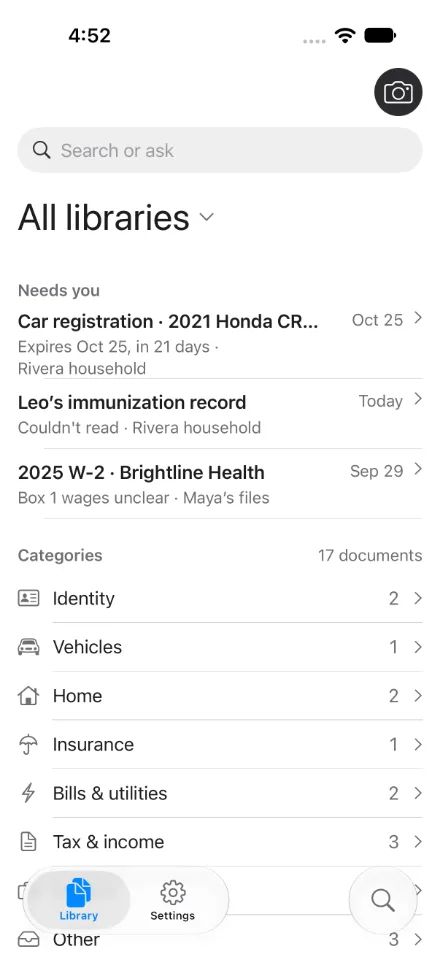
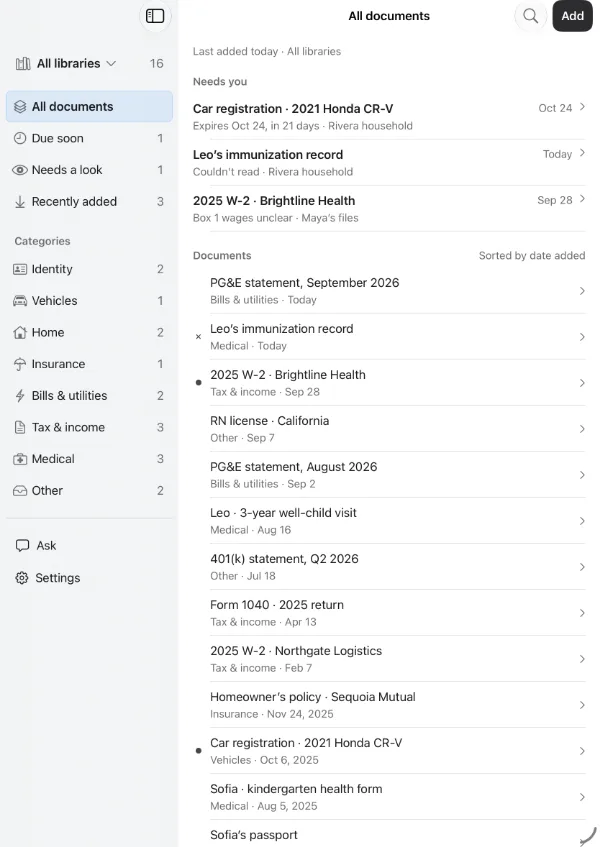
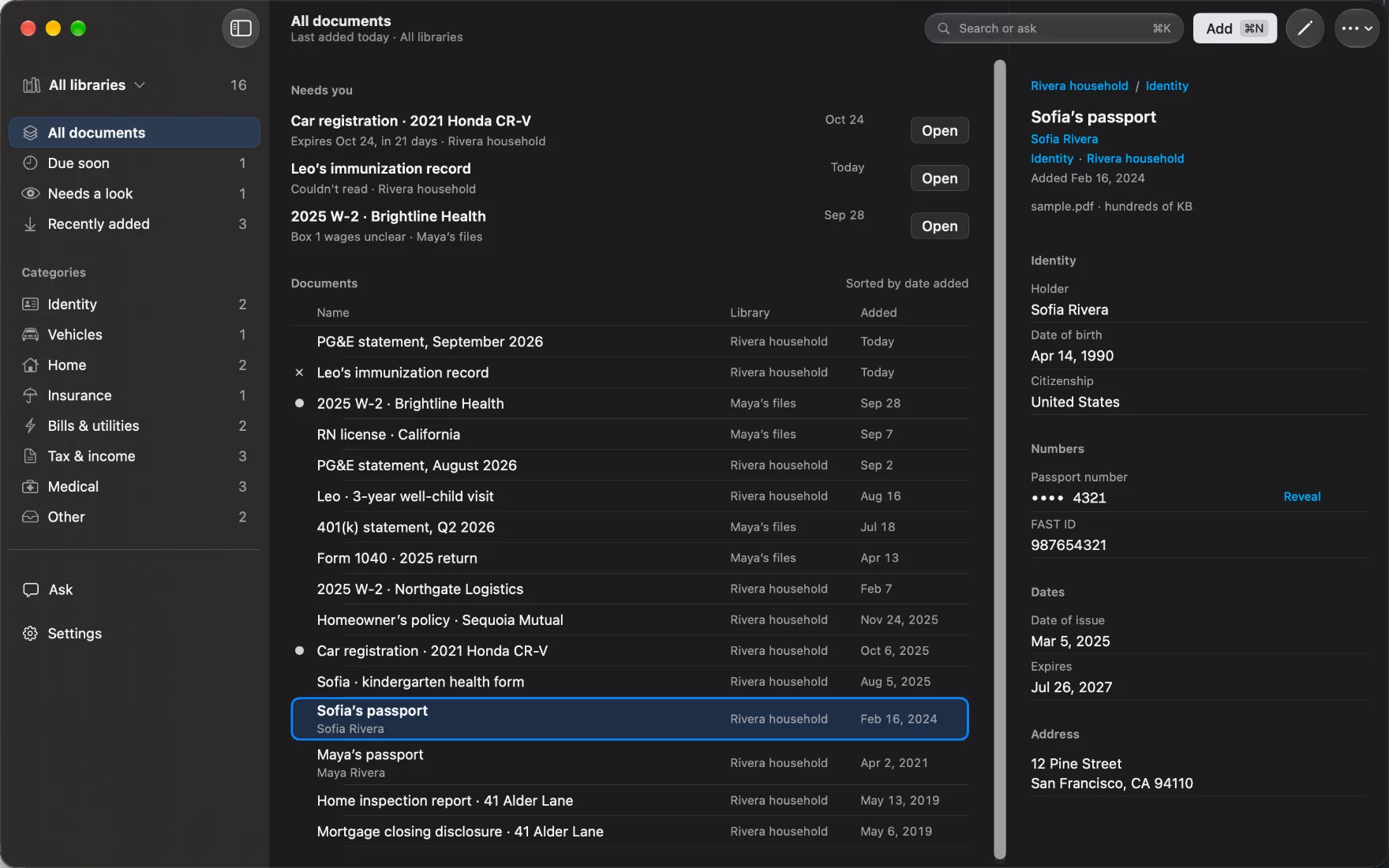
The pictures are from preview builds of the apps.
Don’t trust us with your data.
A company that holds your passports should have to show you it can’t read them. While your library is locked, we can’t. If someone breaches our servers, or a court orders us to hand over what we hold, your documents reach them as encrypted data we have no keys for.
Your devices make the keys and hold them, and our servers store what those keys encrypt. Each step below is specific enough for you, or anyone you trust, to check.
In shortLocked, your vault is unreadable to Almanack — even under breach or a court order. Unlocked, it's decrypted on your device. AI reading, search queries, email-in, documents you choose to report and account metadata are the disclosed exceptions, and the web app itself is code you have to trust us to ship honestly.
Your passkey and your Secret Key
When you sign up, your device creates your account’s key pair and a 128-bit Secret Key.
How the keys combine
To unlock the key pair, your device combines the Secret Key with your passkey, through the WebAuthn PRF extension. Where your passkey manager can’t do that, it uses a master password stretched with Argon2id instead. We never receive your Secret Key, so a stolen copy of our database is useless against your account, even if your password is weak. Your passkey manager signs you in, and the Secret Key stays out of it.
The Emergency Kit
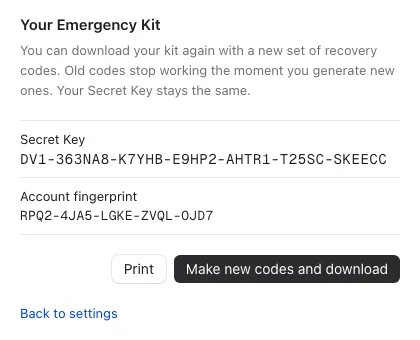
Before sign-up finishes, your device makes your Emergency Kit: a PDF with your Secret Key, ten single-use recovery codes, your email and your key fingerprint.
Recovery and adding a device
We never see it. Print it and keep it somewhere safe and offline.
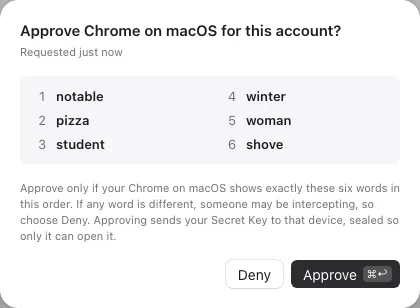
Lose your passkeys or password, and a recovery code plus your Secret Key gets you back in. Using a code alerts every device you still have and usually starts a waiting period in which one of them can cancel it, so a person holding your printed kit can’t take over your account in silence. Some accounts are set to recover immediately, with nothing to cancel. A new device can also receive your Secret Key from one you’ve already signed in on, after you confirm that six words match on both screens.
Keys made on your devices
Each library has its own 256-bit key, made on the device that created it.
How documents and invites are sealed
Before anything uploads, your device seals each document under a fresh key of its own with AES-256-GCM, then locks that key with the library key. Sharing a library with other people is coming back soon, rebuilt so the server can’t fake who’s a member. When it does, a member’s device will wrap the library key to the new person’s public key with HPKE, and we will never put a key in an invite link. Every account has a short fingerprint, like CB22-LHDM-JJJB-57BG-MHLE, that you can compare in person before you share something sensitive.
What our servers hold
We store your encrypted documents, their encrypted titles and tags, and keys wrapped so that your devices can open them.
What we can and cannot see
We can’t read your documents, their titles, filenames or tags, the details Almanack extracts, or your library names.
To run the service we do see some account details: your email address and display name, who is in which library, when your devices connect, when records change, and the words you type into search, with the names and kinds of document from your library sent alongside them, when they reach our reader. A court could compel us to hand those over. See the full list.
How AI reading works
Your device compares what the reader attests to with a release we sign and record in a public transparency log, and sends nothing if they don’t match.
Checks our reader first. The key to your library stays here.
A single-purpose server whose hardware attests to the software it runs. No login, no console. Drops each document’s key when its task ends.
The AI model runs inside sealed hardware running Tinfoil’s published software.
How AI reading works, in full
Your device sends what the task needs: the key to the one document being read, or your question with the details of the documents that matched. The key to your library stays on your device. The reader has no login and no console, and drops each document’s key when its task ends. For reading in the background, it keeps the key to its reading queue in memory until it restarts, so someone able to read its memory could open the documents still waiting in that queue.
The AI model runs at Tinfoil, our inference partner, inside a private enclave: sealed hardware running Tinfoil’s published software. Our reader checks the enclave against that published software before it passes anything on. If the check fails, your document stops at our reader.
Tinfoil’s policy is that it doesn’t retain prompt or response content after it returns a response, and doesn’t use that content to train models (Tinfoil privacy policy). The enclave check proves which software runs, so for retention and training you are relying on Tinfoil’s word. We don’t use your documents to train anything, except a document you choose to send us with Report an issue.
The limits. The model reads your text in plain form inside the enclave. Our reader opens your document before passing it on, so its promise to forget rests on the software we publish. Your device trusts our reader to check the enclave, and that check confirms Tinfoil’s published software, not yet that it is the particular enclave we set up. You can’t run our verifier yourself until we publish it.
Bring every file you own
A library is only useful if all of it is in there. There’s no cap on how many documents you store or how much space they take, within fair use. Reading documents and answering questions count toward the plan’s limits.
Why we built this
Almanack was built by a former Anthropic engineer who wanted the thing on this page for their own family. They wanted to ask an AI about their own family’s paperwork: when a passport runs out, what the insurance covers, what the household paid in tax last year. Every option they found meant giving up control of those documents, or worrying that someone would train a model on them.
So they built it: a library the family holds the keys to, AI reading inside sealed hardware, and a plain account of where that protection stops. Almanack is an independent company, and Anthropic doesn’t make or endorse it.
One plan covers the whole household
$79 a year, or $8 a month
Up to six people and every feature. Try it for 30 days first, without entering a card. You can cancel at any time; Refunds and cancellation says how.
The fine print
Before you put a passport in, you should know where the protection ends. These are the exceptions.
What leaves your device, and when
Report an issue sends us a readable copy
Email-in isn’t available yet
You are trusting the web app we send you
If you lose your keys
If you stop paying
Taking your documents with you
Who sells it to you
Where you can use it
Removing someone keeps what they saw
How Almanack protects your documents lists every account detail we can see.